Boston area
Eastern time, 11:04am

alex@alexholder.studioLinkedIn

Willis eCOA by Brooklyn Health

The 0→1 build of a clinical SaaS platform that adds objective measures to clinician-scored assessments in mental health trials.

Role
Design Director
Disciplines
Design leadership
Research
UX strategy
UI + interaction
Design ops
Brand identity
Platforms
Web
native iOS
Regulations
21 CFR Part 11
HIPAA
GDPR
GCP
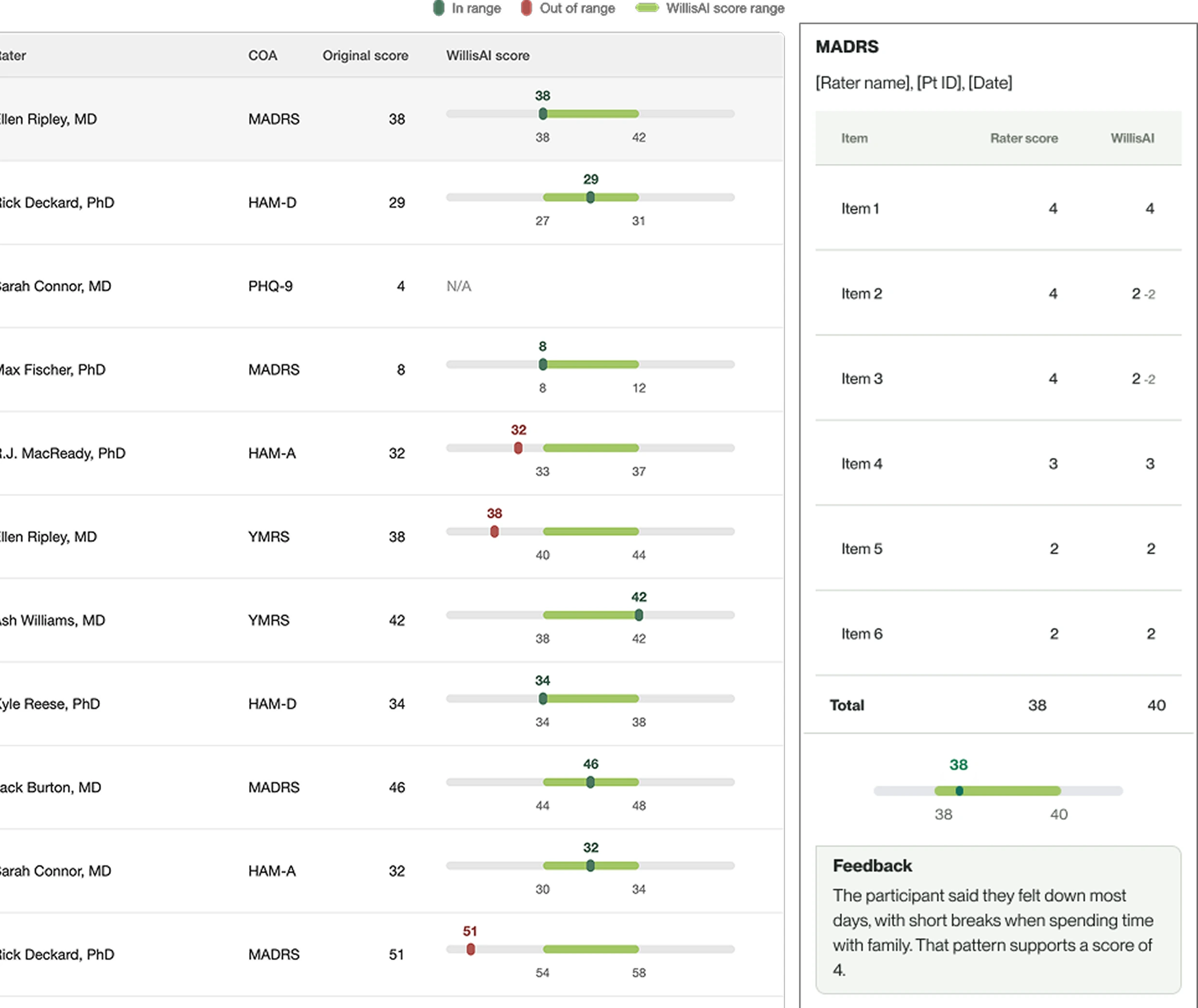
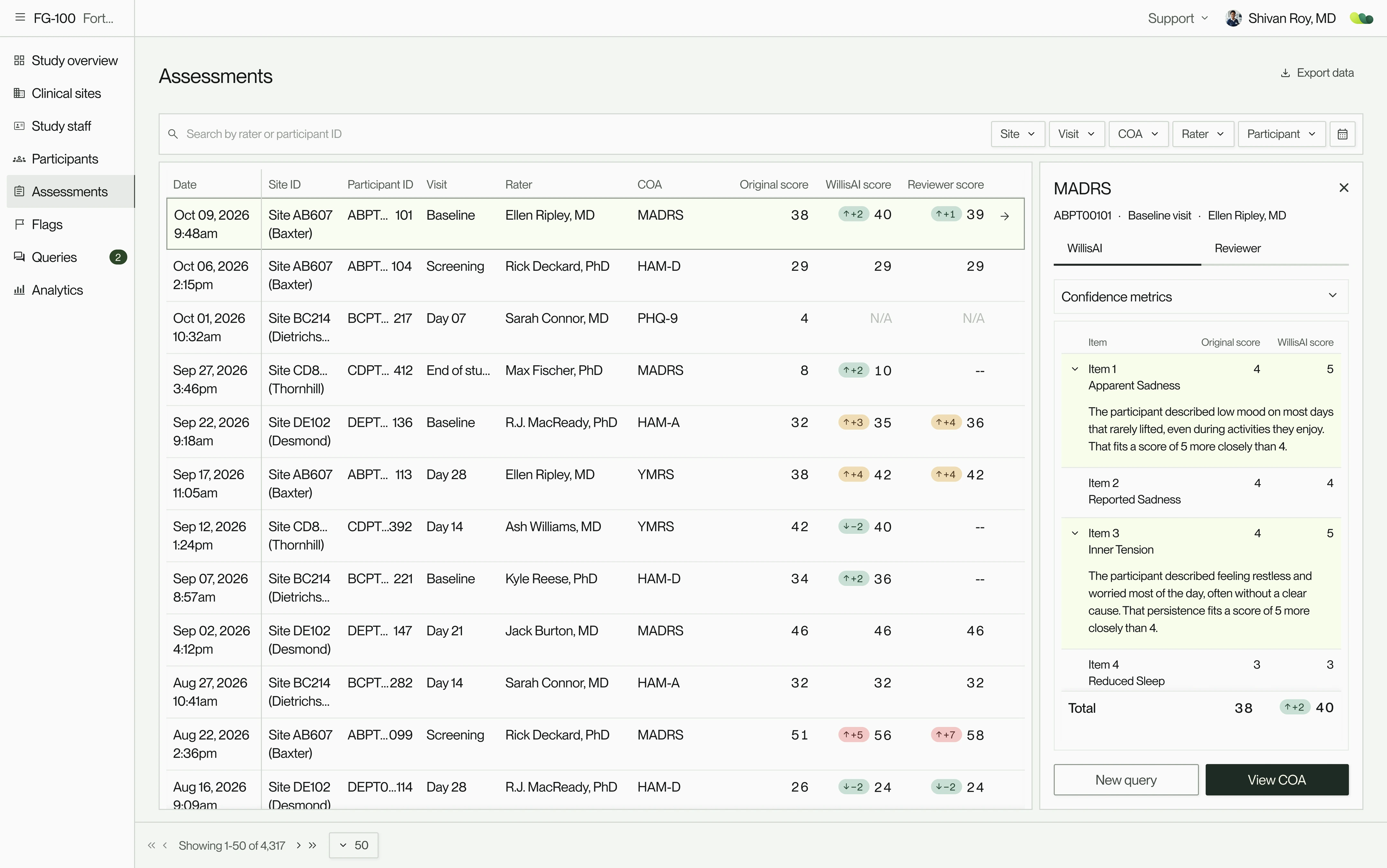
Willis assessments table, with each rater's score beside WillisAI's and a reviewer's, and an item-by-item review panel. Recreated with sample data. View full size
1 yr
of use in a live clinical study
7 mo
to MVP launch
25 → 40+
Product areas across 9 user types

Above:

The Assessments dashboard, with a drill-in comparing WillisAI’s score to the clinician’s, item by item.

Mental health is hard to measure. Symptoms overlap across conditions and subtle changes can go unnoticed, so people are often misdiagnosed or cycle through medications until one works. CNS1 trials share the problem: the evidence of a drug’s efficacy often relies on clinicians scoring participant interviews on validated scales.

For these interviews, Brooklyn Health’s WillisAI scores the recording alongside the clinician and sends any assessment it flags to secondary clinician review. Willis eCOA2 brings that check into everyday trial work, toward more reliable evidence and, in time, more precise treatment.

I led design for Willis from its first screens through two years of growth, making the design decisions across every product area and permission layer, from research and strategy to UX, UI and the brand. Alongside engineering and product, I shaped the design system, processes and operations that made work at that scale manageable.

1CNS
Central nervous system, conditions like Alzheimer’s, depression, schizophrenia, Parkinson’s.
2eCOA
Electronic clinical outcome assessment: the digital capture of the scales and questionnaires used to measure participants’ outcomes.
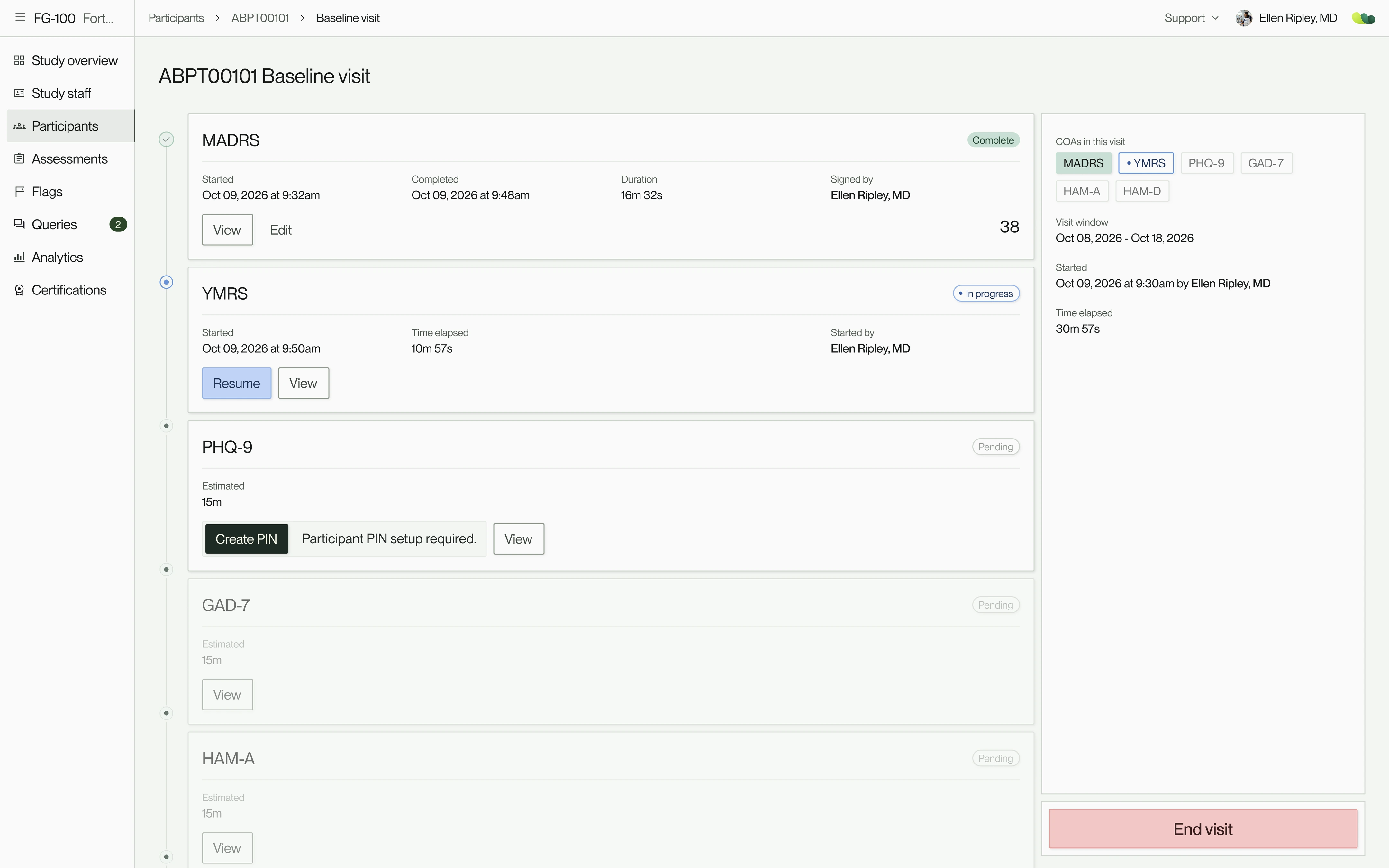
A baseline visit, showing completed, in-progress and pending assessments. Recreated with sample data. View full size
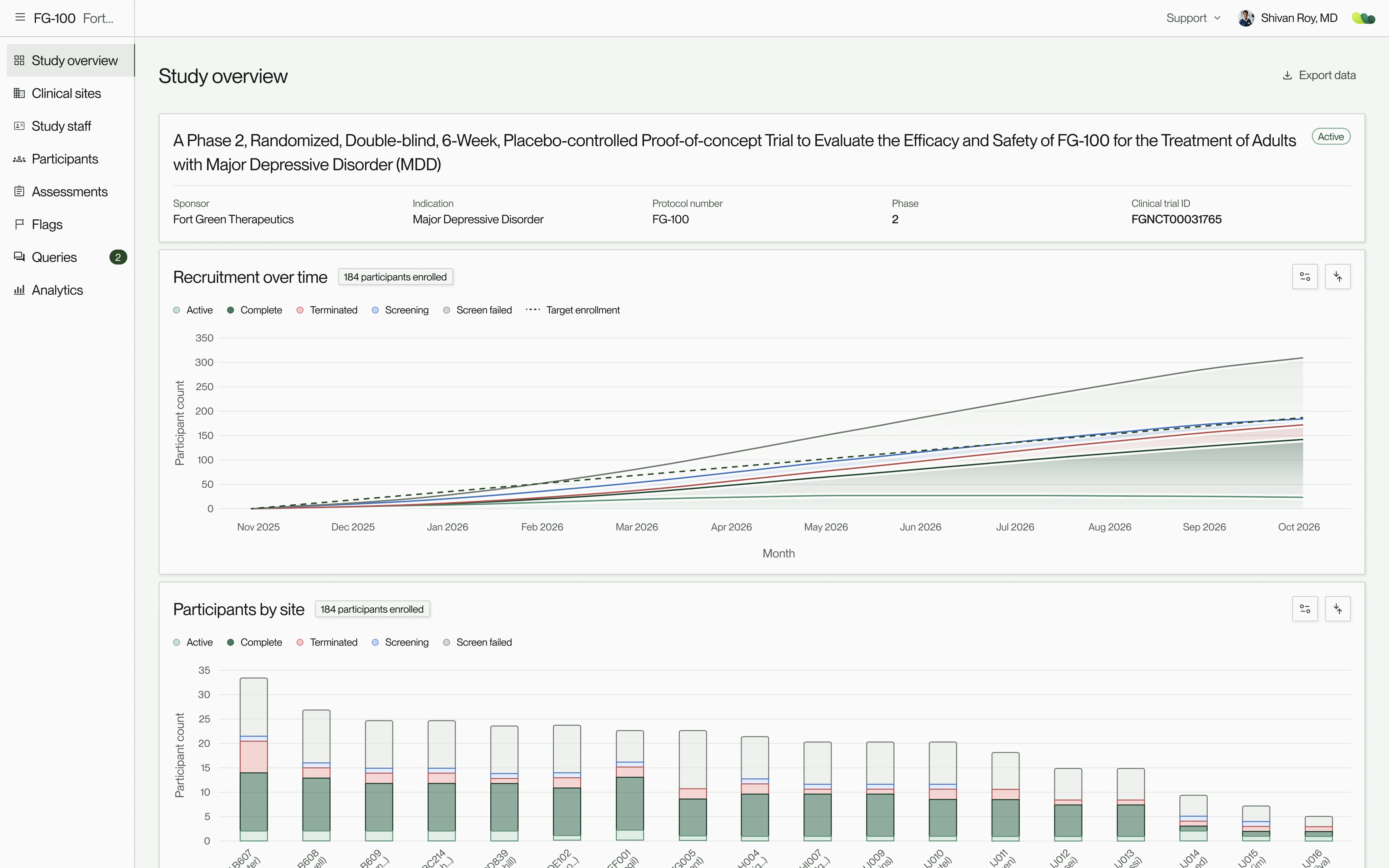
Study overview with study details, recruitment over time and participants by site. Recreated with sample data. View full size

Learning about the world of clinical trials.

Above left:

A baseline visit from the clinician’s view.

Above right:

The sponsor’s view: study details, enrollment by site and recruitment over time on one page.

Clinical trials were new to me, so I started with immersion: regulatory training, persona research and recorded conversations with sponsors, clinicians and PIs3. Each persona needed a different view of the same study, which made permissions critical to define early.

From what we had in writing and recordings, I mapped the product plan, core workflows and permission matrices to see where more research was needed. We hadn’t hired a front-end engineer yet, so I set up a starter UI kit for when one joined.

Sponsors and CROs4 followed data across every site. Site staff, from PIs to raters, cared about their own site and participants. Brooklyn Health’s ops team could reach everything except PHI5, and participants saw only their own questionnaires during their visit.

I inherited persona research and detailed product requirements, and the recordings were of the founder’s own interviews. The initial team was small: a PM, a few scientists and a CTO with a couple of back-end engineers.

3PI
Principal investigator: the doctor who leads a trial at a clinical site and is responsible for its participants and site team.
4CRO
Contract research organization: a company that sponsors hire to run all or part of a trial, from managing sites to handling the data.
5PHI
Protected health information: anything that identifies a participant, such as their name, contact details or medical records.
Who sees what, by persona: scores, PHI, sites, staff and certifications
Persona + priorityScoresPHISitesStaffCertifications
Multiple site accessJudge or run the whole study, never see PHI
SponsorsIs the study healthy across every site, and can its scores be trusted?Full accessNo accessPartial: AllNo accessPartial: Status of raters
CROsKeeping sites on track for the sponsorFull accessNo accessPartial: All that are permittedPartial: CRO staff, if adminPartial: Status of raters
Brooklyn Health opsSetting up studies and keeping them runningFull accessNo accessPartial: AllFull accessPartial: Override capabilities
Single site accessCare for participants with as much PHI as the study allows for those permitted access.
Principal investigators (PIs)Their participants, the study data, and how their raters performFull accessPartial: As configuredPartial: Own site (can be multi)Partial: If adminPartial: Their raters’
RatersThe participant in front of them, their own data, and their certificationFull accessPartial: As configuredPartial: Own sitePartial: If adminPartial: Own
CoordinatorsEnrolling participants and keeping visits on scheduleFull accessNo accessPartial: Own sitePartial: If adminNo access
In the visit roomAnswer own questionnaires on site tablet, then hand it back to their clinician.
ParticipantsCompleting their own questionnairesNo accessNo accessNo accessNo accessNo access

Product plan is mapped, assumptions tested, and core workflows validated

Above:

Access across the seven MVP roles. The first split was how many sites roles could see, the second was which roles could access PHI.

7 kinds of user meant 7 versions of every flow, more than our timeline allowed. To simplify, we designed most flows twice: once for multi-site users (sponsors, CROs and our ops team) and once for single-site users, the site staff running visits.

We tested early with mid-fidelity screens. Walking both groups through every core flow showed how much still lived on paper: PHI in a physical book, notes on loose sheets, certifications and past visits in binders.

What stayed analogue and what moved in-app
We had planned full participant management in Willis: names, dates of birth, contact details and, for participants who needed one, a care partner. In testing, a few sites were keen to use it. Most, even clinicians with permission, were cautious about PHI on screen and wanted control over what they entered. So PHI became configurable per study, with a participant ID as the only requirement. Notes moved into each assessment, and sites were relieved that having certifications and past visits in the app meant less time tracking down binders and files.

What we cut
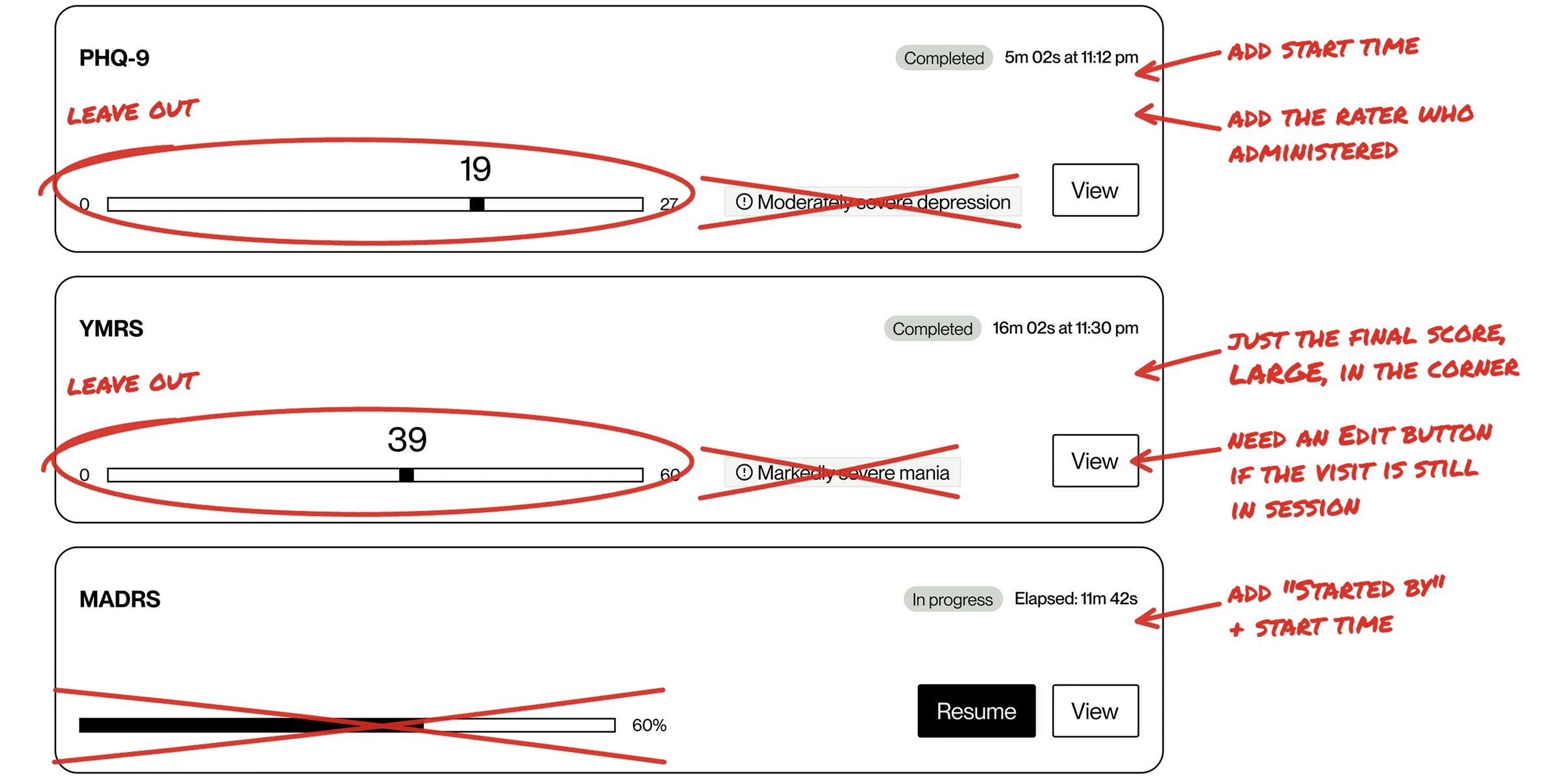
On a participant’s visit page, each assessment is a card showing its status, rater and score. Our early cards also showed where the score fell on the scale’s range, with its severity label (e.g., MADRS6 19 = mild depression). Raters read a visit as a whole and already knew what the numbers meant, so the marker and label were noise that could mislead. We kept the score alone.

6MADRS
Montgomery–Åsberg Depression Rating Scale: a clinician-rated scale, widely used in trials, for measuring how severe a participant’s depression is.

Dec 2024 · Workflow validation

Digitized paper processes

Walking sites through mid-fidelity screens of every core flow showed how much of their work still lived outside software.

  1. At sitePHI in a physical bookKept apart from everything else
    In WillisHeld only as far as each study allowedConfigured per study, by the site’s preference
  2. At siteNotes on loose sheetsWritten during the interview
    In WillisA note on each item of a clinician-rated assessmentSaved with the assessment, on record for audits
  3. At siteCertifications in bindersWith expiry dates, resubmitted for every new study or retrained before onboarding could start
    In WillisRater certification profilesA certification follows the rater from study to study
  4. At sitePast visits in bindersLooked up by hand when a past visit needed checking
    In WillisOne participant table, sorted by next visit windowEnrolled and screening participants first
  5. At siteEDC (electronic data capture)The study’s case report forms
    In WillisStayed where it wasAn established system: Willis took on the clinical outcome assessments, and the case report forms stayed in the EDC
Three mid-fidelity assessment cards, PHQ-9, YMRS and MADRS, redlined after site sessions: leave out the score range and severity label, add the start time and the rater who administered it, show just the final score, large, in the corner, and add an Edit button while the visit is in session. View full size
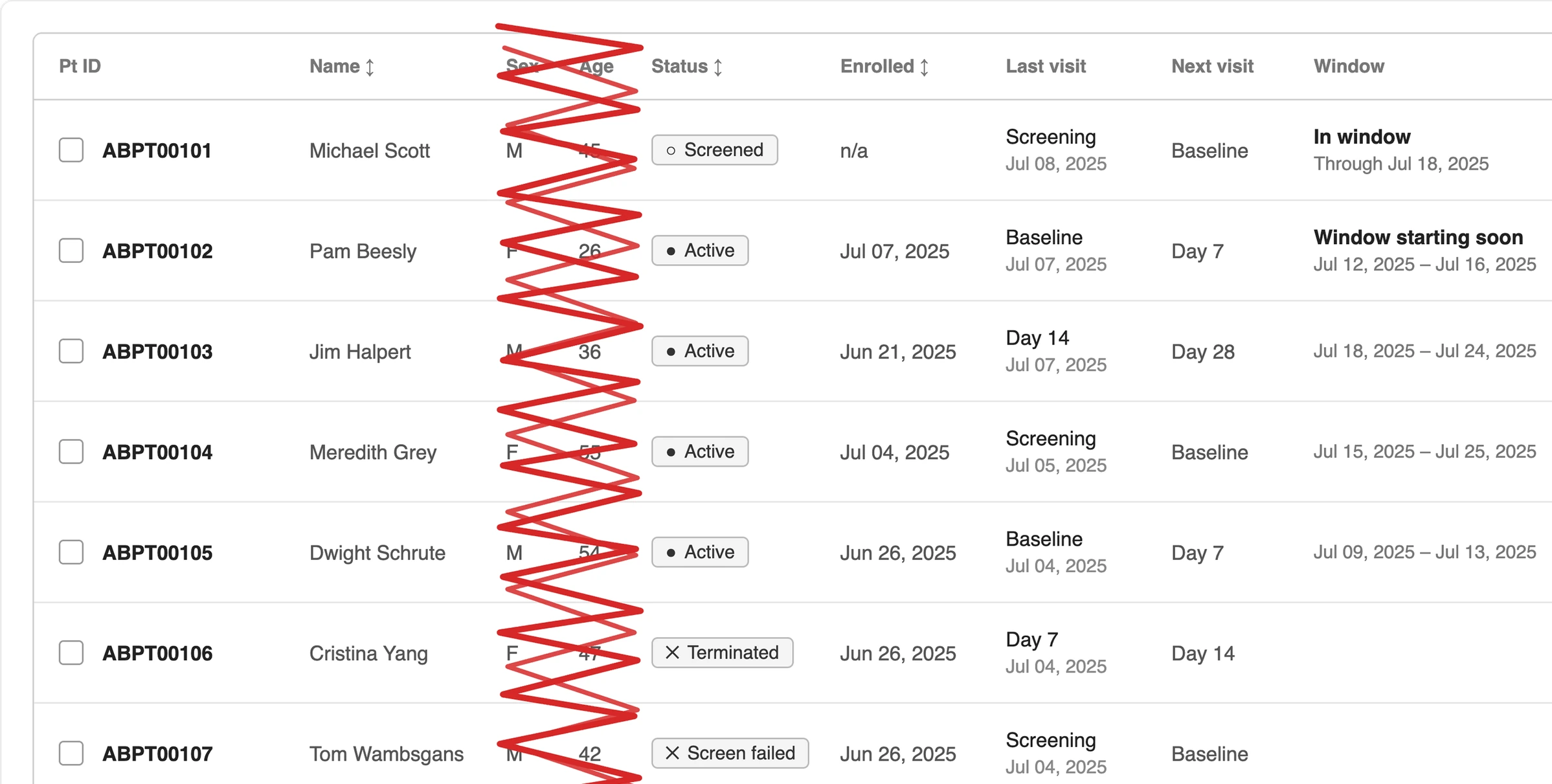
The mid-fidelity participant table, redlined: the sex and age columns are struck out. Columns for participant ID, name, status, enrolment date, last visit, next visit and visit window remain. View full size

Introducing users to WillisAI

Above left:

Mid-fidelity assessment cards, December 2024, annotated after site sessions. The score range, severity label and progress bar came out, and each card gained who administered it and when.

Above right:

The participant table from the same round. Sex and age came out, with PHI now configured per study. Names are hidden until a permitted user turns them on with a toggle.

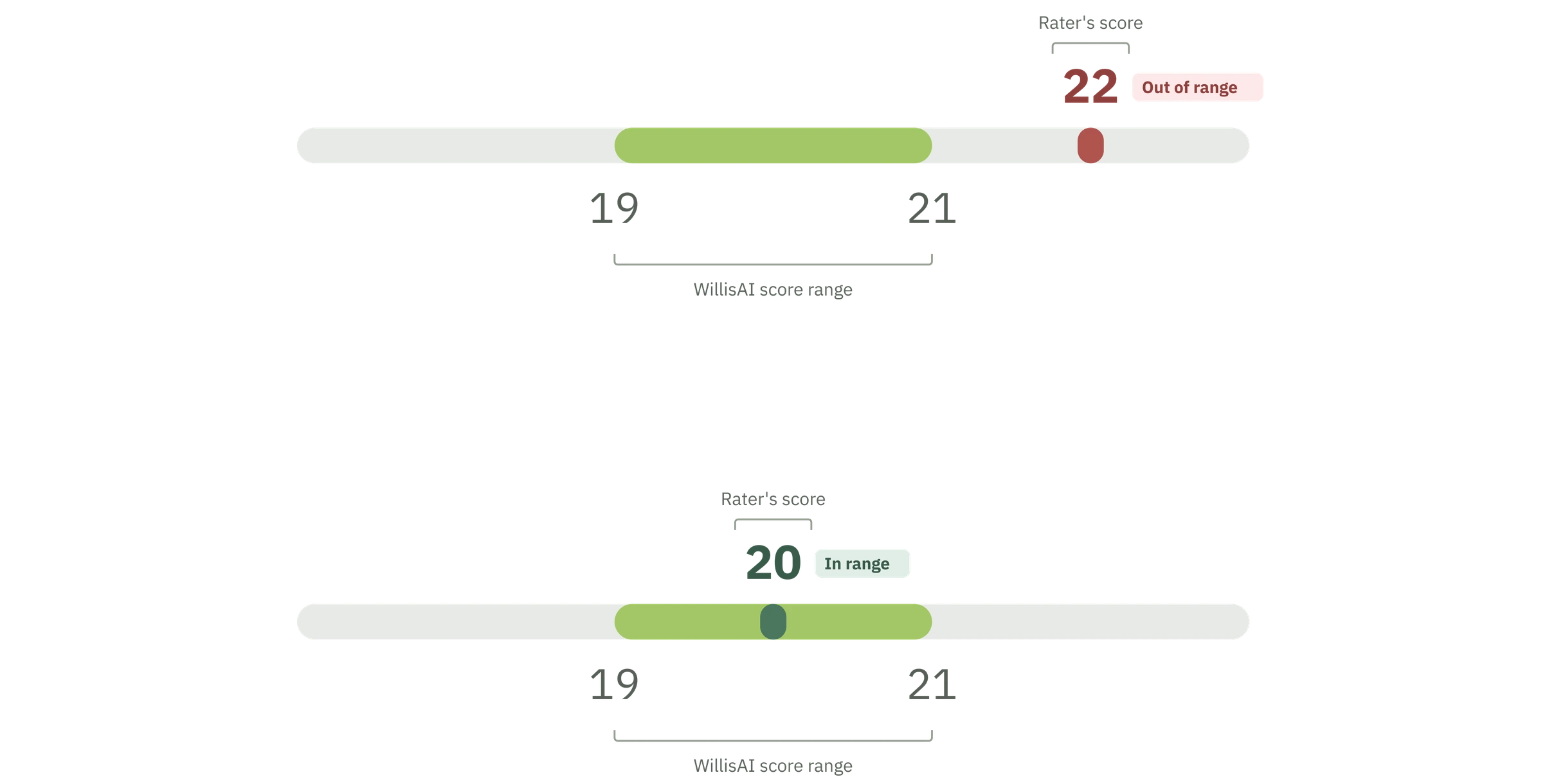
We also tested, for the first time, how users responded to WillisAI, showing its score beside a rater’s. To show how the two compared, we started with a slider: WillisAI’s range as a band, with the rater’s score marked against it.

Sponsors responded well to seeing the two scores side by side. Site raters and PIs were more skeptical: what reassured a sponsor read to them as a grade on their own work, and seeing participants visit after visit shaped their scores in ways a single recording couldn’t capture. That made the item-by-item breakdown we’d already planned more important: WillisAI had to show the reasoning behind its score, so raters could treat it as a second opinion to check against their own.

The recreated slider in two states: a rater's score of 22, out of range, to the right of WillisAI's 19 to 21 score range; and a score of 20, in range, inside it. View full size
The recreated assessments table, each rater's original score plotted against WillisAI's score range, beside a side panel with item-by-item rater and WillisAI scores and WillisAI's feedback. Recreated with sample data. View full size

Launch date is set for May 2025, MVP scope narrows to fit

Above left:

The slider, recreated from the December 2024 design: the rater’s score marked against WillisAI’s range, green inside it and red outside. After launch, users found the slider format confusing, and it became the delta in the screen shown at the top of the page.

Above right:

The same comparison across the assessments table, with item-by-item scores and WillisAI’s feedback in the side panel.

The initial requirements described a far larger platform than we could build by May. Its core was endpoint quality through comparative scoring, and rater quality, so we pared the MVP down to the essentials that made those possible: what a visit needed to move from site to WillisAI to sponsor.

For sites, that meant profiles, visit timelines and an assessment template that most clinician-rated and patient-reported scales could be built into. Raters would see their certification status on each required scale and train for the rest. Sponsors would follow the study through an overview, flags and analytics, each score beside WillisAI’s. Features like queries and data change requests, which question or correct data after a visit, were tabled for later releases.

The launch was timed to the ASCP7 conference in late May 2025.

The visit flow came first, since WillisAI needed recordings to evaluate. Visits had to be run by qualified clinicians, so staff management put certified raters on each study, and rater profiles showed sponsors who was ready to rate.

Every screen in development and staging ran on mock data, analytics included, so we could build and demo before a single real visit, with no participant data outside production.

7ASCP
American Society of Clinical Psychopharmacology, whose annual meeting draws trial sponsors, CROs and researchers.
The product map as MVP scoping closed in January 2025OnboardingLoginWillisOrganizationOrg infoUsersAccountPersonal infoLogin & securityExperienceSupportTerms of UsePrivacy PolicyStudyStudy overviewClinical sitesParticipantsAdd participantView participantView visitClinROsMADRSeSignaturePROsGAD-7PHQ-9StaffAdd staffProfile (read only)WIPCRO staffSite staffDCRDeferred out of initial MVP scopeCreate DCRNew DCRView DCRQueriesDeferred out of initial MVP scopeCreate queryCompleted COAsFlagsView COA reviewAnalyticsClinical measuresFlagsEnrollmentCertificationTraining module
  • Onboarding (Slated for the MVP)
  • Login (Had mid-fidelity designs)
  • Willis (Had mid-fidelity designs)
    • Organization (Slated for the MVP)
      • Org info (Slated for the MVP)
      • Users (Slated for the MVP)
    • Account (Slated for the MVP)
      • Personal info (Slated for the MVP)
      • Login & security (Slated for the MVP)
      • Experience (Slated for the MVP)
    • Support (Slated for the MVP)
      • Terms of Use (Slated for the MVP)
      • Privacy Policy (Slated for the MVP)
    • Study (Had mid-fidelity designs)
      • Study overview (Had mid-fidelity designs)
      • Clinical sites (Had mid-fidelity designs)
      • Participants (Had mid-fidelity designs)
        • Add participant (Had mid-fidelity designs)
        • View participant (Had mid-fidelity designs)
        • View visit (Had mid-fidelity designs)
          • ClinROs (Slated for the MVP)
            • MADRS (Slated for the MVP)
              • eSignature (Slated for the MVP)
          • PROs (Slated for the MVP)
            • GAD-7 (Slated for the MVP)
            • PHQ-9 (Slated for the MVP)
      • Staff (Had mid-fidelity designs)
        • Add staff (Had mid-fidelity designs)
        • Profile (read only) (Had mid-fidelity designs) WIP
        • CRO staff (Slated for the MVP)
        • Site staff (Slated for the MVP)
      • DCR (Deferred out of initial MVP scope) Deferred out of initial MVP scope
        • Create DCR (Deferred out of initial MVP scope)
        • New DCR (Deferred out of initial MVP scope)
        • View DCR (Deferred out of initial MVP scope)
      • Queries (Deferred out of initial MVP scope) Deferred out of initial MVP scope
        • Create query (Deferred out of initial MVP scope)
      • Completed COAs (Had mid-fidelity designs)
        • Flags (Had mid-fidelity designs)
        • View COA review (Had mid-fidelity designs)
    • Analytics (Had mid-fidelity designs)
      • Clinical measures (Slated for the MVP)
      • Flags (Slated for the MVP)
      • Enrollment (Slated for the MVP)
    • Certification (Had mid-fidelity designs)
      • Training module (Slated for the MVP)

Choosing the tech stack and designing to what it could ship

Above:

The product map as MVP scoping closed in January 2025. Dark outlines had mid-fidelity designs we could validate, grey areas were slated for the MVP but not yet designed, and struck areas were deferred.

Our front-end engineer finally joined at the end of February. My starter UI kit was planned around Tailwind and React. Their component libraries covered our UI, but syncing them with our Figma tokens meant building that pipeline ourselves, more time than our launch date allowed. Together we moved it to PrimeVue: a library just as broad, with a ready-made, customizable way to carry our Figma tokens into code.

With the stack set, we migrated to PrimeVue. Where they didn’t match, we simplified: tables and filters were pared down to what PrimeVue could ship natively, and patterns that needed heavy customization were deferred.

Engineering needed designs the moment the stack was settled. Over those weeks I moved every design from Untitled UI to PrimeVue’s Figma kit and handed off screens as each one was ready to build.

Closing a gap in onboarding

Onboarding turned out more complex than anticipated, largely because of regulation. Under 21 CFR Part 118, each electronic signature in a trial must belong to one verified person, so every account needed a confirmed identity before anyone could sign anything.

That made a forwarded invitation a real risk: whoever held it could set a password first, lock out the intended user and strand the account. So an emailed code came before any credential, and no one counted as logged in until they’d verified.

Brooklyn Health set up each organization behind the scenes (a sponsor, CRO or site) and named its admin, who was invited first, finished the organization’s details, then invited their own staff. Each account had one email but could belong to several organizations, so an admin of more than one had to complete each organization’s details.ite would have tablets by launch, so like most iOS flows, it was tabled until after the MVP.

Password creation moved from the first screen into personal details, closing the window where an unverified account already had a credential. Anyone who left after verifying lost what they’d entered, so invitations stayed valid for 72 hours, and users could request a new one. SSO users authenticated through Google or Microsoft, so only password users required MFA.

We also planned a PIN so raters sharing a visit could pass one tablet without a full logout. No site would have tablets by launch, so like most iOS flows, it was tabled until after the MVP.

821 CFR Part 11
The FDA rule for electronic records and signatures: how a system verifies who people are, protects records and keeps an audit trail.
  1. Org adminSends the inviteWith the person's role.
  2. EmailInvite arrivesExpires after 72 hours. Admins can resend it.
  3. Verification firstEmailed codeProves the inbox is theirs.
    1. SSO usersSign in with Google or MicrosoftThe identity provider handles authentication.
    1. Password usersDetails and passwordOne step instead of two.
    2. Password usersSet up MFAAuthenticator app at MVP.
  4. New org onlyAdd org infoThe site admin enters their organization's details. Everyone else skips it.
  5. Signed inIn WillisOnly now do they count as logged in.

Original plan · tossed, joined to Add org info ↑

  1. First screenSet a passwordBefore anything was verified.
  2. ThenVerify emailToo late: the account already had a credential.
  3. ThenPersonal detailsA separate step. Too long, so it merged with the password.
  4. ThenAdd MFAProtected an account that might not be theirs.
Tabled for MVPRater PINTo pass one tablet between raters without a full logout. No site had tablets at launch, so it waited.

Designing the assessment

Above:

The invite flow as designed in March 2025: an emailed code before any credential, then SSO, or a password with MFA, plus organization details for a new org’s admin. In red, the original plan it replaced.

With launch two months out, we took on the raters’ core task: administering an assessment during visits. We optimized it for tablets, the device typically used during visits, and designed it in segments engineering could assemble into a template for any scale: clinician-rated scales with required recording, item navigation and notes, and patient-reported questionnaires simplified for the participant.

Every step also had to stand up to an audit. Visits and assessments record who started and finished them and when, and each Part 11 signature joins a history built for the data change requests to come.

Recording was required for clinician-rated scales, since WillisAI needs every interview. Raters had to be able to skip items, take notes on each, and pause if needed, but could not cancel. A cancel option was dropped after sites said it could count as malpractice.

With rater PINs deferred, raters signed off on assessments with their username and password, and a history panel recorded the date, time, name and score at each signing.

Patient-reported screens used larger text, recorded nothing and locked answers once submitted. Handoff screens, with short animated loops by our illustrator Doug Fuchs, marked the tablet passing to the participant and back. Taking it back required the rater’s signature.

Willis would run in trials across countries, so the platform had to be ready for more than one language. At sites that ran visits in several languages, each participant’s language was recorded when they were added, so the rater knew which language the visit would be in.

The visit header tracked each visit from pending to in progress to completed, and starting before the window required a reason.

  1. Any site adminAdd a participantParticipant ID and any study fields. Starts as screening; visit windows set at enrollment.
  2. RaterStart the visitOne click. Lists the visit’s scales. Starting early asks for a reason.
  3. For each scale, one of two paths

    Clinician-rated

    1. RaterRater administers itRecording runs throughout. A score and a note per item.
    2. RaterReview and signScores and notes on one page, signed with username and password.
    3. In the backgroundRecording uploadsAutomatic once the recording ends. WillisAI scores it.

    Patient-reported

    1. RaterRater hands over the tabletA handoff screen marks the pass.
    2. ParticipantAnswers itLarger text, no recording. Answers lock when submitted.
    3. RaterTakes the tablet backWith their signature.

    Then the next scale, until every scale is done

  4. Site staffEnd the visitRaters can edit responses until then. Ending it locks them.
Tabled for MVPData change requestChanging a value after the visit ends. The signature history was built ready for it.
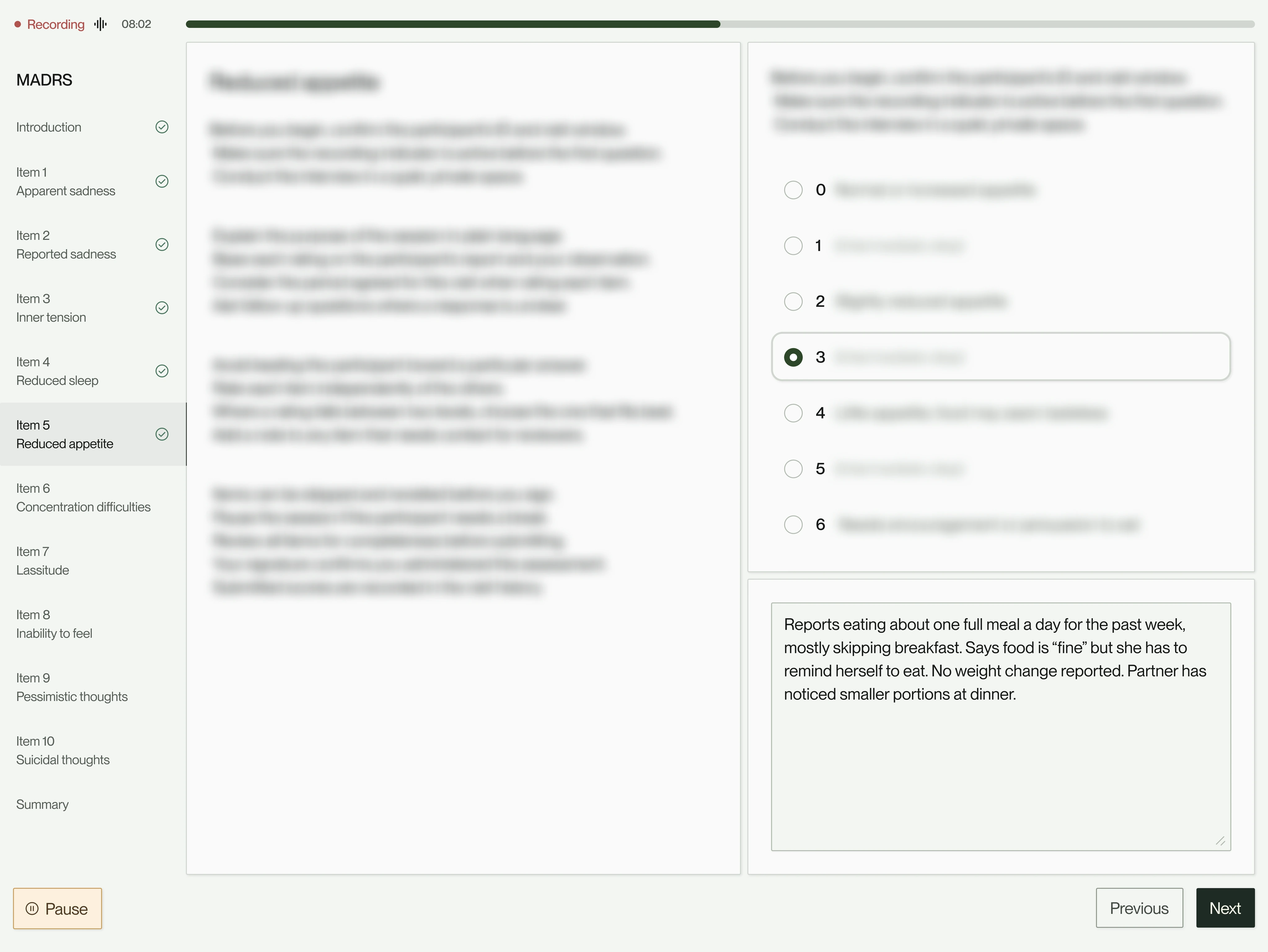
A clinician-reported assessment in progress, with recording on, item navigation, scoring and notes. Scale content blurred for licensing. Recreated with sample data. View full size
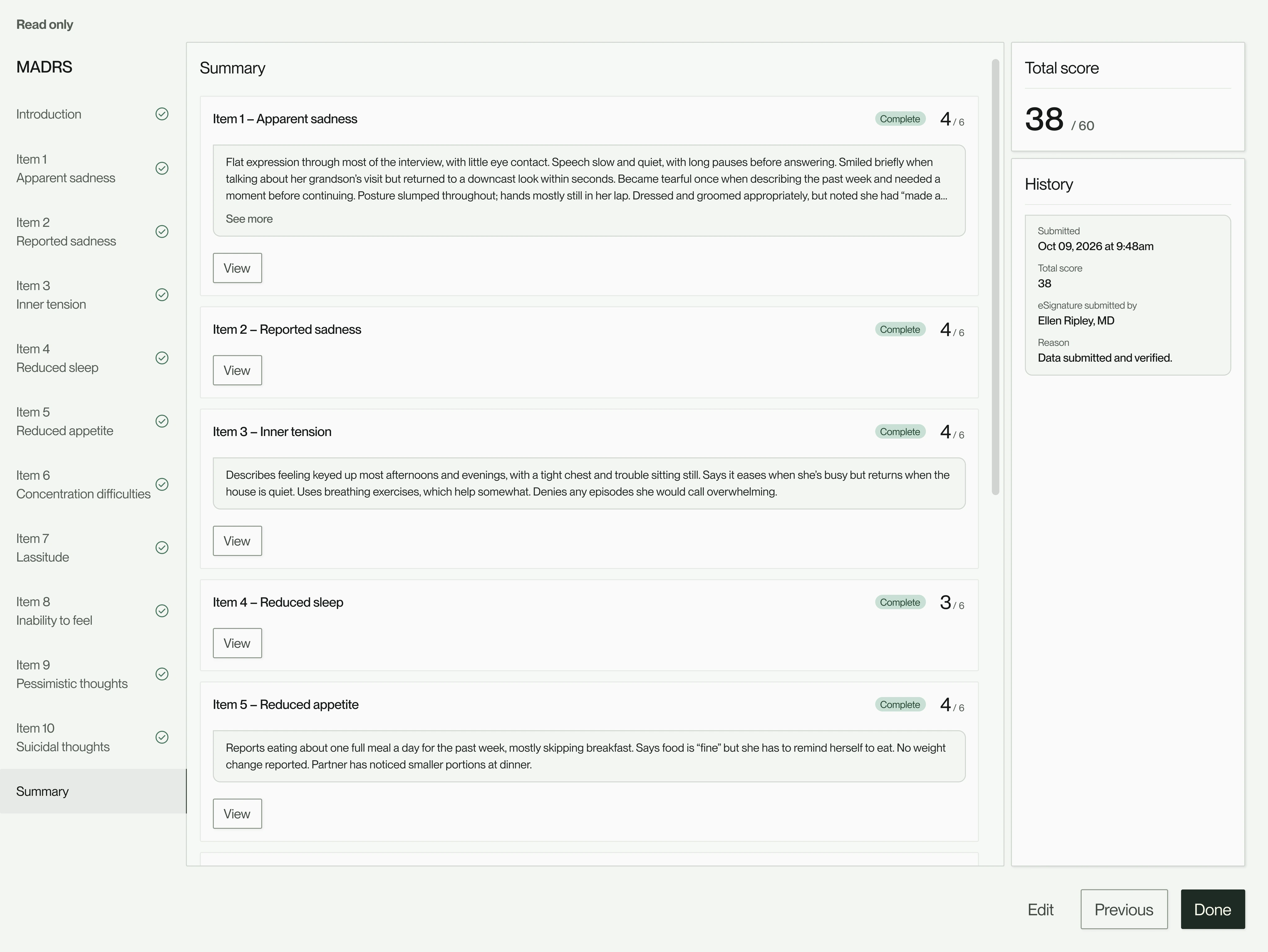
The same assessment signed and read only, with item scores, notes, the total and its signing history. Recreated with sample data. View full size
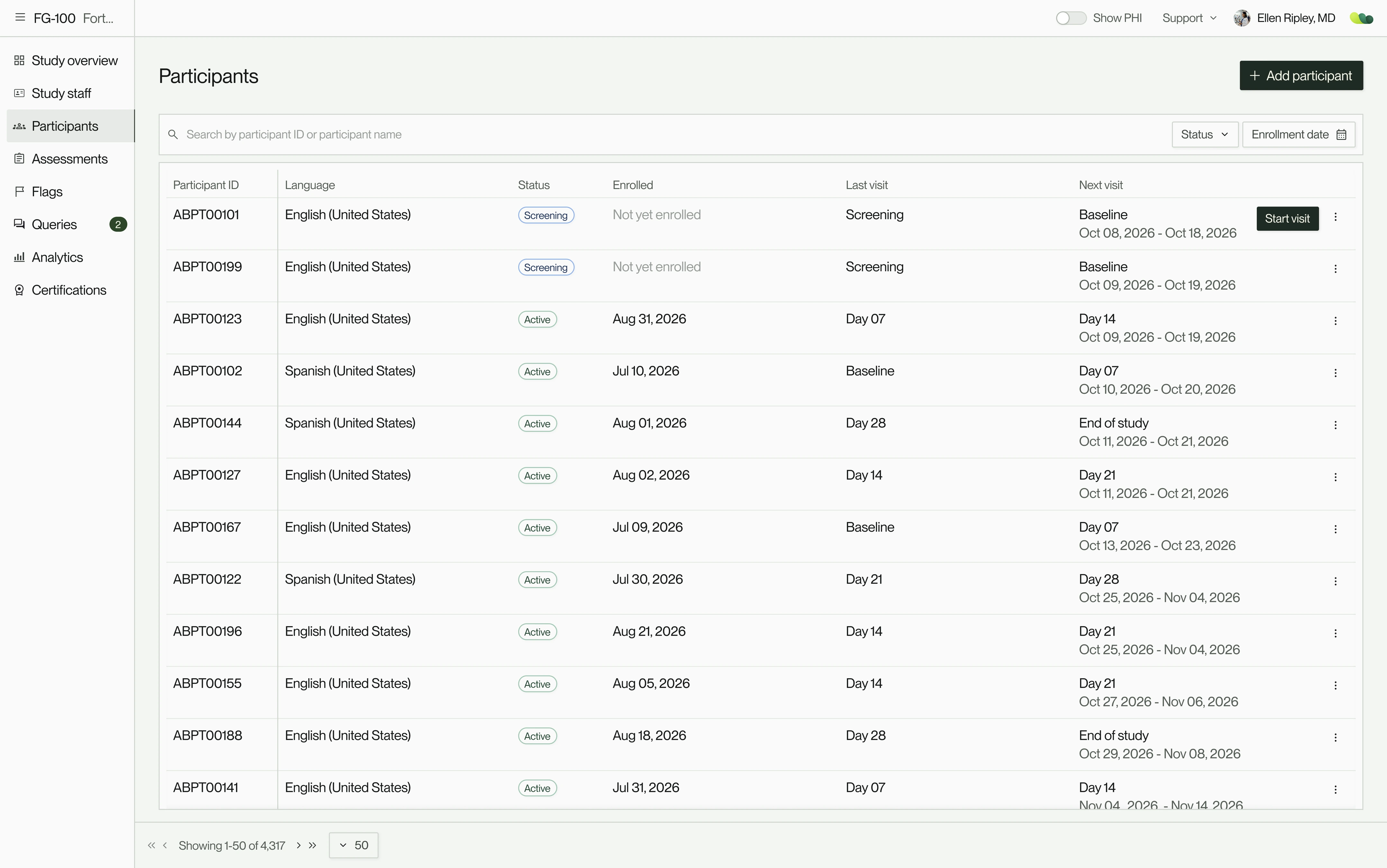
The participants table: two screening participants first, then active participants sorted by their next visit window, with a Start visit button on the first row. Recreated with sample data. View full size
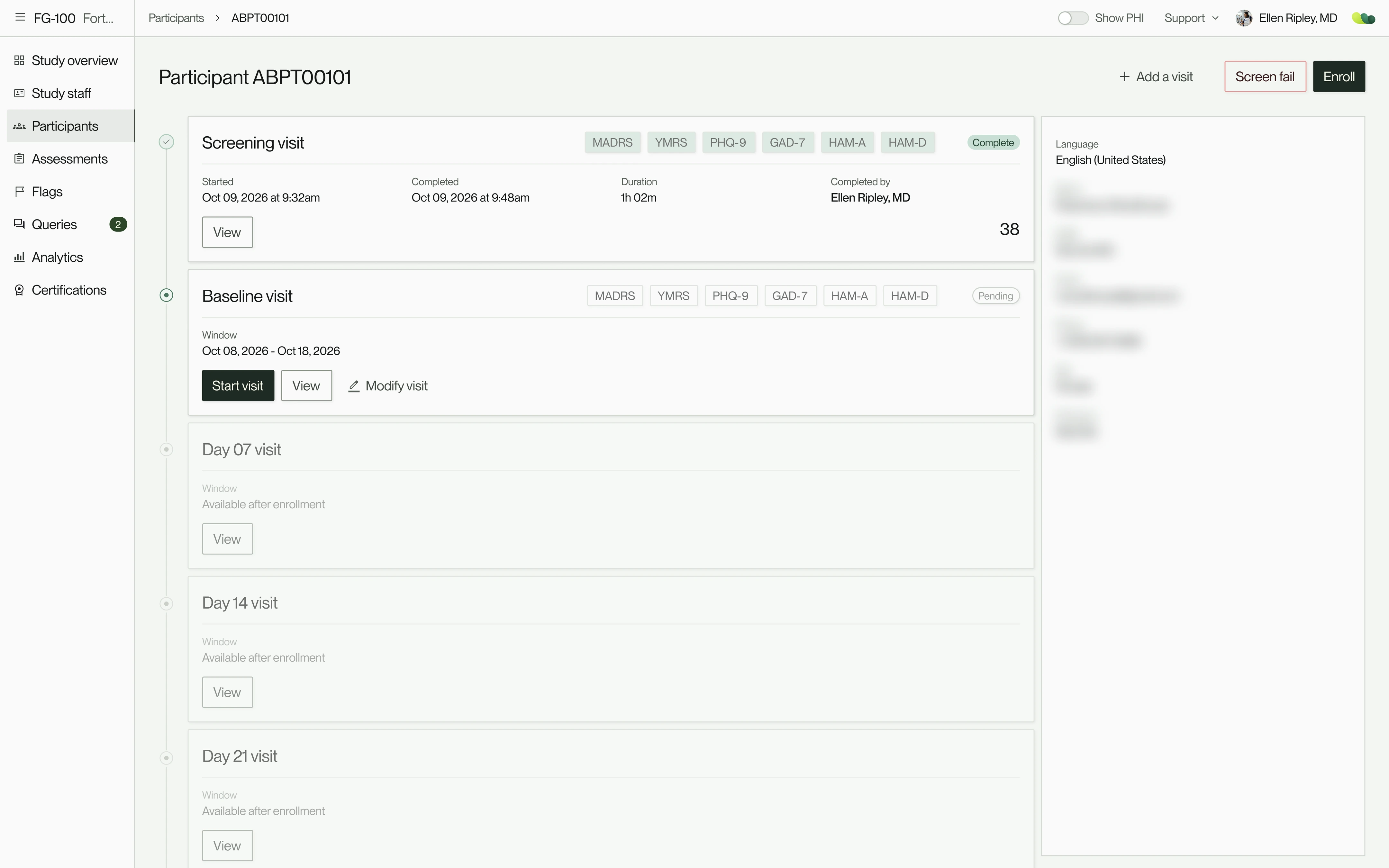
A participant’s page: a completed screening visit, a baseline visit ready to start, and later visits waiting on enrollment. Recreated with sample data. View full size
A baseline visit: each scale on a card with its status and score, the visit window beside them, and End visit at the bottom right. Recreated with sample data. View full size

0→ 1 complete, $6.5m seed round raised, and our first live study preparing to onboard

Above:

A visit at launch, from adding a participant to ending the visit. Each scale takes one of two paths: clinician-rated, recorded and signed by the rater; or patient-reported, answered by the participant on the site’s tablet. Data change requests came later.

Then:

A clinician-reported assessment in progress, recreated with sample data. Recording runs throughout, each item takes a score and a note, and scale content is blurred for licensing.

Below it, the same assessment once signed, read-only, with its score history.

Above:

The participants table, recreated with sample data. Screening participants come first, then everyone else by their next visit window, and the next visit can start right from the table.

Above left:

A participant’s page, recreated with sample data. Screening is done, the baseline visit is ready to start, and later visit windows open once the participant is enrolled. PHI stays hidden until a permitted user turns on Show PHI.

Above right:

The baseline visit. Each scale sits on a card with its status, timing, signer and score, and End visit locks the visit once every scale is done. The participant PIN on the PHQ-9 card came shortly after launch.

On May 27, Brooklyn Health announced a $6.5M seed round led by HealthX, with Metrodora Ventures, Story Ventures and RiverPark Ventures among the investors. The pitch was demoed with the prototypes and screens we had designed.

The next day, we launched the MVP at ASCP. Sites were glad to see a product designed alongside them, with assessments that looked familiar from paper and were easier to administer. When our first live study came on board that summer, sites ran visits with no training on the platform.

Before our first live study came on board that summer, we ran a usability test across every work path to catch anything major. It turned up minor fixes, and we validated the ClinRO and PRO formats. Onboarding went smoothly, with no UX issues raised.

At the launch party, team members carried laptops around to walk site staff, sponsors and CROs through the platform. Sponsors responded with excitement and plenty of questions: how study health would be tracked, how a flag moves from raised to resolved, and what analytics could show next.

Before the study came on board, we ran a usability test across every work path. It turned up only minor fixes and confirmed the clinician-rated and patient-reported formats. Once it was live, support requests were mostly bugs, and certifications held in the app made onboarding each new study fast.

From there, the roadmap followed what sites, sponsors and audits needed: the features left out of the MVP, and continued improvements to running visits and reading data, shaped by user feedback and usability tests.

The product map, release by release, from the MVP to two productsOnboardingWillisBKH opsUsersOrgsStudiesAcademyTraining coursesTraining moduleScoring practiceScoring moduleInterview practiceAI interview moduleLicensesBillingOrganizationOrg infoUsersAccountPersonal infoLogin & securityExperienceCalendars & schedulingSupportTerms of UsePrivacy PolicyeCOAStudyOverviewParticipant managementAdd participantParticipant visitClinROsManual entryPROsParticipant PINPerfROsVisitsCentral rater schedulingClinical sitesStaff managementAdd staffCRO staffSite staffReview staffCentral rater staffAssessmentsWillisAI reviewSecondary reviewAnalyticsEndpoint qualityClinical measuresFlagsEnrollmentFlagsQueriesCreate queryCertificationsTraining moduleEvaluation moduleeSignatureCOA recording playbackVirtual patient

Users

  • Sponsors
  • CROs
  • Site investigators
  • Site raters
  • Coordinators
  • Brooklyn Health ops
  • Secondary clinician reviewers
  • Central raters

Users

  • Sponsors
  • CROs
  • Site investigators
  • Site raters
  • Coordinators
  • Brooklyn Health ops
  • Secondary clinician reviewers
  • Central raters

Aug 2026 · Release 26.08

  • Willis
    • BKH ops
      • Users
      • Orgs
      • Studies
    • Academy
      • Training courses
        • Training module
      • Scoring practice
        • Scoring module
      • Interview practice
        • AI interview module
      • Licenses
      • Billing
    • Organization
      • Org info
      • Users
    • Account
      • Personal info
      • Login & security
      • Experience
      • Calendars & scheduling
    • Support
      • Terms of Use
      • Privacy Policy
    • eCOA
      • Study
        • Overview
        • Participant management
          • Add participant
          • Participant visit
            • ClinROs
              • Manual entry
              • eSignature
            • PROs
              • Participant PIN
            • PerfROs
        • Visits
          • Central rater scheduling
        • Clinical sites
        • Staff management
          • Add staff
          • CRO staff
          • Site staff
          • Review staff
          • Central rater staff
        • Assessments
          • WillisAI review
          • Secondary review
        • Analytics
          • Endpoint quality
          • Clinical measures
          • Flags
          • Enrollment
        • Flags
        • Queries
          • Create query
        • Certifications
          • Training module
          • Evaluation module

Growing beyond the MVP

Above:

From one product at launch to two on a shared platform. New areas and new users are highlighted at each release.

After launch, Willis grew release by release: from about 25 product areas to more than 40, from one product to two (Willis eCOA and Willis Academy), from web to web and native iOS, and from designing for 7 personas to permission layers each study could configure.

Looking back

Talking to users from the start mattered most. A network of PIs, raters, coordinators and sponsors would look over designs whenever we asked, so we could design alongside the people who would use the product, and a team rich in clinical and industry expertise was an invaluable resource.

If I did it again, I’d make more of those conversations informal. We treated each one as a formal session, and quick, ad hoc check-ins along the way could have helped us narrow scope sooner, trading breadth for depth and quality, and saving iterations later. The design system and operations that let a small team keep this pace are the subject of a separate case study.

There was a lot to cover in this story, and I’ve still only scratched the surface. If you have any questions or would like to hear more, please reach out to me at alex@alexholder.studio.